20110513

Speed up your JDBC queries with MetaModel

Although the recent MetaModel version 1.7.1 was a minor release there is something about this release that excites me very much! That thing is our new FETCH_SIZE calculator. So what is that you might say? Well, here’s a little background.

In JDBC there is an option to set the so-called FETCH_SIZE of a query statement, like this:

Statement st = connection.createStatement();
st.setFetchSize(10000);
ResultSet rs = st.executeQuery(...);

What this does is that it tells the database how many rows should be fetched from the database when more rows are needed. In other words: A buffer size, measured in the amount of rows.

Cool – so this means you should set a rather high fetch size if you have plenty of memory? Say 20.000 records? Well, sometimes yes, but not quite at all times!

The guys over at Oracle has done an exemplary work on documenting the memory consumption of their latest JDBC driver. From this you can learn that if you put a too high fetch size, you might run out of memory! But on the other hand you would really like to optimize the buffering of your result sets! The trouble is that the row size in memory is hugely different if you select 1, 2, 10 or 300 columns in your query! Furthermore the size of a VARCHAR(4000) value in the buffer is about 8000 times larger than a BIT value! These findings lead to a very nice new feature in MetaModel: Dynamically setting an appropriate fetch size, depending on the query you are executing...

How does this work? Well basically MetaModel has all the needed meta-information for doing a strictly mathematical calculation. MetaModel knows the data types of all your columns, it knows their column sizes and most importantly – it knows which columns you are querying! So if we want to allow eg. up to 8 megs of memory to be used for the query buffer, then it’s very easy for us to figure out the needed FETCH_SIZE – in principle it’s just to divide the available memory with the size of a single row in the buffer.

So far I’ve tested it out together with some friends of DataCleaner that have both small tables and 200-300 column tables and they see a dramatic improvement in performance as well as it prevents a few OutOfMemory issues!

A final remark – I haven’t seen any other Java frameworks that do something like this. Even Hibernate only has the option to specify a constant FETCH_SIZE:
<property name="hibernate.jdbc.fetch_size">10000</property>

But as explained in this blog entry you will hopefully agree that such an approach is not optimal unless your application only executes a single query again and again!

For more information on MetaModel, please visit the website.

20110413

Two types of data profiling

Recently I've been blogging about how I see that DataCleaner is what I would dub a 'Data Quality Analysis (DQA) tool' more than anything else. This leads me to an explanation of what I mean by DQA tool, profiling tool and more.

So...

Data profiling is in my worldview the activity of extracting (and possibly refining) a set of analysis metrics from your data. As such it is a quite boring and trivial tasks that you can even automate rather easily.

The interesting question is not what data profiling is, but why it is! I see two main reasons and they have quite different characteristics as to how you would use a profiling tool!

The (chronologically) first reason that you would apply data profiling is to perform an analysis. Not a technical analysis, but an analysis where you apply your human reasoning. You investigate the metrics to discover your data. If you're a good analyst you will also continuously refine your analysis, challenge it and change settings to see what happens. For this a profiling tool enables you to go below "the tip of the iceberg" (a common phrase about profiling) in your datastores.

The second reason is for monitoring your data quality. A profiling tool has the power to extract the metrics so you will often see that people use profiling tools to perform a set of data quality validation tasks. It is used as a way to retain a quality level. In this case of data profiling you execute the same analysis again and again - only the data changes (over time).

Do you see other applications of data profiling tools?

20110319

Coming up in DataCleaner: Single window UI

Lately I've been working on an fundamental improvement to the UI of DataCleaner that I think is quite important, and I would really like to present it to gather some reactions and ideas for further development.

The idea was to change the UI metaphor with regards to windows. Currently you might say that the left hand window is the "environment" window - it contains management of datastores and reference data (dictionaries, synonyms, patterns) as well as the file menu which includes links to various global dialogs etc. The issue with this window is that it is an additional window that you always have to carry with you, even though you want to focus on a particular job. My aim was to find a way to remove the window, but retain all it's abilities, but make the job creation the main focus of the UI.

So here's what we've done so far:

  • Moved datastore selection (and management) to the workbench (analysis job) window.
  • Moved the file menu to the workbench window.
  • Created a separate dialog for management of reference data, accessible through the file menu.

Here's a screenshot of the first concept, datastore selection and management. This is what you'll see when the app starts up (the cursor is hovering the MySQL icon, which is why it has an "information bubble"):


Once a datastore has been selected and the "Analyze!" button is clicked, the schema tree will become visible and will correspond to the analysis job window as you already know it.

In the next screenshots you can see the contents of the new "Reference data" menu in the top of the screen:


... and the dialog that it links to:


So what do you think? I hope that it's a bit more intuitive of course. The metaphor was to make something similar to a typical office application, where you begin with an empty document which you can build, or you can choose to open a saved document if you want to resume previous work.

If you want to try it out, simply check out the trunk of AnalyzerBeans and DataCleaner and build it! ... Here's the command line summary:

svn co http://eobjects.org/svn/AnalyzerBeans/trunk/ AnalyzerBeans
cd AnalyzerBeans
mvn install
cd ..
svn co http://eobjects.org/svn/DataCleaner/trunk/ DataCleaner
cd DataCleaner
mvn install
cd target
java -jar DataCleaner.jar

Enjoy and please provide feedback :)

20110303

The complexity of cleansing a name

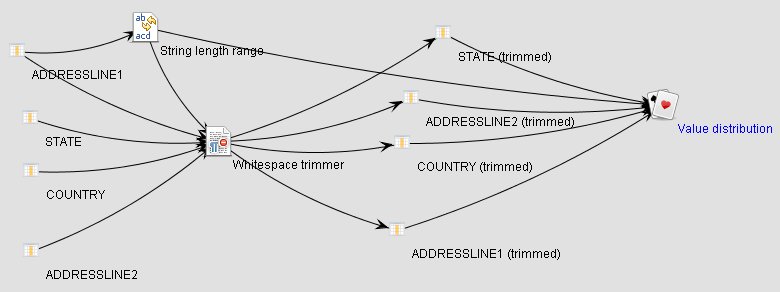
Following up on Winfried van Holland's blog post on having to cleanse 180 million names I thought I'd share a cool screenshot from a funny moment at the Human Inference office today, when we where experimenting with good ways to visualize our execution flow in DataCleaner...

The diagram shows 1) the steps that we go through in our filtering process, 2) the dependencies between them, 3) and a circle layout that we tried out and dismissed ;-)

Anyways, a funny moment and quite a nice view of just how much execution power you can extract from a tool like DataCleaner.

20110217

Pre-processing in DataCleaner 2: Why?

Last monday we released the new DataCleaner 2.0 and one of the major new features in it is the ability to transform and filter your data using the tool. Previously the common answer for someone asking about transformation in DataCleaner has been to tell them that "there are already good tools for this available elsewhere, so use them". So why did we choose to focus on data processing in DataCleaner 2.0? And what are the capabilities of DataCleaner in terms of transformations? Is DataCleaner over time going to evolve into a full-fledged ETL tool? I'll try to answer these questions.

All your data quality functions in one place

The obvious answer is that we want to provide more data quality functionality and that transformations is something that a lot of people need. While doing data profiling it is often needed to do data adjustments, eg. to tokenize values, extract certain information, filter which rows gets profiled etc. You can also do all this also by applying an ETL tool or maybe even by creating database VIEWs. The problem with such an approach is that it will eventually get in your way because you're trying to get 2-3 independent tools to work nicely together, instead of just having these functions available where you need them.

Transformations for the DQ domain

Possibly even more important is that the transformations that you want to employ in Data Quality analysis are typically quite different than those that come out-of-the-box in database scripts and ETL tools. Such tools are typically quite generic and will provide general purpose tokenizers etc., but will typically lack transformations pertaining to the DQ-domain, such as date mask matchers, dictionary lookups and synonym replacements, standardization of email adresses, names and URL's.

Non-persistent transformations

When you do pre-processing in separate tools, you also need to persist your transformed datasets. In Data Quality analysis this is just a waste of resources and provides poor performance. If you need to perform transformations, apply filtering etc. for the purpose of analysis, profiling and exploring your data it is much more feasible to just perform these transformations when needed in stead of storing them up front. This also allows for a much more free user experience where you can actually experiment with your data and you analysis in stead of having to overthink it.

Is DataCleaner's validator gone? No, it's just filtering with added output handling!

DataCleaner 1.x was known to have a strict separation between the activities "profile" and "validate". Since this separation is gone in 2.0, one might ask, "Is DataCleaner's validator gone? I can only see analysis jobs!". But the answer is no, we just consider validation as a type of analysis (thus, analysis is a broader term, comprising both profiling, validation and more). You can easily perform all the validation operations of DataCleaner 1.x, but the approach is a bit different because you basically apply filters in stead of "validators". There is even an example of this in the "Introduction to analyzing, cleansing and filtering data" webcast, available on DataCleaner's website.

20110214

DataCleaner 2 released, Human Inference acquires eobjects.org, I have a new job and dataqualitypro.com even publishes a nice article about it

Earlier I've promised you some "Big news" today and here it is... Hmm, where to start, so much to say.


OK, let's start with the software, after all that's what I think most of my blog readers care most about:


DataCleaner 2.0 was released!

To me this is the biggest news for the DataCleaner community in a LONG time. DataCleaner 2.0 is a major release that I and my new employer (read more below) have put a lot of effort into. I just had a look at some source code statistics and actually the 2.0 release is larger (in terms of lines of code, source code commits, contributions etc.) than all previous DataCleaner releases together. I don't want to say a lot about the new functionality here, because it's all presented quite well at the DataCleaner website.

More information: Watch out, dirty data! DataCleaner 2.0 is in town!


MetaModel 1.5 was released!

My other lovechild, MetaModel, have also just been released in a version 1.5! MetaModel 1.5 is also a quite big improvement on the previous 1.2 version. The release contains a lot of exciting new features for doing querying and datastore exploration as well as a lot of maturity bugfixes.

More information: What's new in MetaModel 1.5?


And then let's move on to a major announcement that I definately think will affect the eobjects.org community positively:


Human Inference acquires eobjects.org

This might come as a surprise to quite a lot of you, so let me explain a bit. For some years DataCleaner and the other eobjects.org projects have been independent open source projects that I've invested a lot of time in. The projects have grown nicely in terms of users and the ideas have been manyfold. My ambitions for the projects have always been high, but they suffered from the fact that I was mostly working on them in my free time. One of the many fun things about doing these projects was that I've gotten to meet up with a lot of exciting people that thought my projects where interesting. At one time I met some people from the data quality vendor Human Inference, who thought DataCleaner was great and they wanted to know if they could in some way use it in collaboration with their commercial offerings. From my end of the table I was on the other hand thinking that their products offered some features that would be an excellent addition to DataCleaner's functionality. So what we did was a deal to try and raise the value for both parties. And with that in mind, here's the press release about it:

More information: Human Inference completes acquisition of DataCleaner and eobjects.org

I have a new job

I now work with Human Inference to actively grow the DataCleaner project, MetaModel as well as Human Inference's commercial products. We're building really exciting cloud-based data quality services that I think will complement the open source offering nicely. Of course it's not all going to be free, but I promise that even for the users who don't want to pay for the additional services, the acquisition and my new job will be beneficial anyway, because we're adding a lot of new resources to the projects that are improving on both the open source parts and the commercial plug-ins.


And in the end I just also want to mention that Data Quality Pro has a great article about a lot of these news, including an interview with me and Sabine Palinckx, the CEO of Human Inference.

More information: Open Source DataCleaner gets a major update, Human Inference enters the Open Source Data Quality Market

20110204

Big news ...