Showing posts with label datacleaner. Show all posts

20150227

DataCleaner 4 - a high-quality user experience to provide high-quality data

It's been a long time since I've blogged about DataCleaner and that's partly because I've been busy on other projects - partly because the thing that I'm going to blog about now has been a very long time in the making. We're right now in the final stages of building DataCleaner version 4 which is (in my opinion) going to be a pretty disruptive move for the tool. And especially for the tools usability and user experience.


The UI of DataCleaner is changing in many ways. The moment you start DataCleaner 4 you will see that the initial start screen has been simplified, beautified and is in general a lot less busy than previous versions. We also focus on what you want to have done by offering quick start options such as answering questions "Are my address correct and up-to-date?" or more openly "What can you tell me about my data?". More such options are going to be added by the way ...

Registering and selecting your data in DataCleaner 4 is also a whole lot easier.


When you start building your job, the way of working with it has undergone a drastic change... For the better! We've introduced a graph-based canvas which means that what you work with is a process flow that is in my opinion (and in fact everyone we've talked to about this) is a lot more intuitive and matches the mental model of our users.


The components/functions that you want to apply to your job are positioned in the left-side tree and can now just be dragged on to the canvas. Draw lines between them and you start to design the data quality analysis job that you need. It's quite simple really.

There's a bunch more we want to do of course. That's why it's not released. But for those curious minds, you can get it already as a early access download here. I hope to get some good review/feedback remarks. Let us know how we're doing :-)

20130618

Introducing Apache MetaModel

Recently we where able to announce an important milestone in the life of our project MetaModel - it is being incubated into the Apache Foundation! Obviously this generates a lot of new attention to the project, and causing lots and lots of questions on what MetaModel is good for. We didn't grant this project to Apache just for fun, but because we wanted to maximize it's value, both for us and for the industry as a whole. So in this post I'll try and explain the scope of MetaModel, how we use it at Human Inference, and what you might use it for in your products or services.


First, let's recap the one-liner for MetaModel:
MetaModel is a library that encapsulates the differences and enhances the capabilities of different datastores.
In other words - it's all about making sure that the way you work with data is standardized, reusable and smart.

But wait, don't we already have things like Object-Relational-Mapping (ORM) frameworks to do that? After all, a framework like OpenJPA or Hibernate will allow you to work with different databases without having to deal with the different SQL dialects etc. The answer is of course yes, you can use such frameworks for ORM, but MetaModel is by choice not an ORM! An ORM assumes an application domain model, whereas MetaModel, as its name implies, is treating the datastore's metadata as its model. This not only allows for much more dynamic behaviour, but it also makes MetaModel applicable only to a range of specific application types that deal with more or less arbitrary data, or dynamic data models, as their domain.

At Human Inference we build just this kind of software products, so we have great use of MetaModel! The two predominant applications that use MetaModel in our products are:
  • HIquality Master Data Management (MDM)
    Our MDM solution is built on a very dynamic data model. With this application we want to allow multiple data sources to be consolidated into a single view - typically to create an aggregated list of customers. In addition, we take third party sources in and enrich the source data with this. So as you can imagine there's a lot of mapping of data models going on in MDM, and also quite a wide range of database technologies. MetaModel is one of the cornerstones to making this happen. Not only does it mean that we onboard data from a wide range of sources. It also means that these source can vary a lot from eachother and that we can map them using metadata about fields, tables etc.
  • DataCleaner
    Our open source data quality toolkit DataCleaner is obviously also very dependent on MetaModel. Actually MetaModel started as a kind of derivative project from the DataCleaner project. In DataCleaner we allow the user to rapidly register new data and immediately build analysis jobs using it. We wanted to avoid building code that's specific to any particular database technology, so we created MetaModel as the abstraction layer for reading data from almost anywhere. Over time it has grown into richer and richer querying capabilities as well as write access, making MetaModel essentially a full CRUD framework for ... anything.
I've often pondered on the question of What could other people be using MetaModel for? I can obviously only provide an open answer, but some ideas that have popped up (in my head or in the community's) are:
  • Any application that needs to onboard/intake data of multiple formats
    Oftentimes people need to be able to import data from many sources, files etc. MetaModel makes it easy to "code once, apply on any data format", so you save a lot of work. This use-case is similar to what the Quipu project is using MetaModel for.
  • Model Driven Development (MDD) tools
    Design tools for MDD are often used to build domain models and at some point translate them to the physical storage layer. MetaModel provides not only "live" metadata from a particular source, but also in-memory structures for e.g. building and mutating virtual tables, schemas, columns and other metadata. By encompassing both the virtual and the physical layer, MetaModel provides a lot of the groundwork to build MDD tools on top of it.
  • Code generation tools
    Tools that generate code (or other digital artifacts) based on data and metadata. Traversing metadata in MetaModel is very easy and uniform, so you could use this information to build code, XML documents etc. to describe or utilize the data at hand.
  • An ORM for anything
    I said just earlier that MetaModel is NOT an ORM. But if you look at MetaModel from an architectural point of view, it could very well serve as the data access layer of an ORM's design. Obviously all the object-mapping would have to be built on top of it, but then you would also have an ORM that maps to not just JDBC databases, like most ORMs do, but also to file formats, NoSQL databases, Salesforce and more!
  • Open-ended analytical applications
    Say you want to figure out e.g. if particular words appear in a file, a database or whatever. You would have to know a lot about the file format, the database fields or similar constructs. But with MetaModel you can instead automate this process by traversing the metadata and querying whatever fields match your predicates. This way you can build tools that "just takes a file" or "just takes a database connection" and let them loose to figure out their own query plan and so on.
If I am to point at a few buzzwords these days, I would say MetaModel can play a critical role in implementing services for things such as data federation, data virtualization, data consolidation, metadata management and automation.

And obviously this is also part of our incentive to make MetaModel available for everyone, under the Apache license. We are in this industry to make our products better and believe that cooperation to build the best foundation will benefit both us and everyone else that reuses it and contributes to it.

20130117

Cleaning Danish customer data with the CVR registry and DataCleaner

I am doing a series of 3 blog entries over at Data Value Talk about the political and practical side of the Danish government's recent decision to open up basic public data to everyone. I thought it would be nice to also share the word here on my personal blog!
Click the images above to navigate to the three chapters on my blog:
Cleaning Danish customer data with the CVR registry and DataCleaner.

20120819

Gartner's Magic Quadrant for Data Quality Tools


Over the last two year I've been obsessed with Gartner and their analyses of the Data Quality market. It's not because they're always right in every aspect, but a lot of times they are, and in addition they are very prominent opinionmakers. And in all honesty, a huge part of one's personal reasons to do open source development is to get recognition from your peers.

While leading the DataCleaner development and other projects at Human Inference, we definately are paying a lot of attention to what Gartner is saying about us. Also before I joined Human Inference, Gartner was important to me. Their mentioning of DataCleaner in their Who's who in Open Source Data Quality report from 2009 was the initial trigger for contact to a lot of people, including Winfried van Holland, CEO of Human Inference. So on a personal level I have a lot to thank Gartner for.

Therefore it is with great proudness that I see that Human Inference has been promoted to the visionary quadrant of Gartner's Magic Quadrant for Data Quality Tools annual report, which just came out (get it from Gartner here). That's exactly where I think we deserve to be.

At the same time I see they are mentioning DataCleaner specifically as one of the strong points for Human Inference. This is because of the licensing model that we lend ourselves to with it, and for the easy-to-use interface which it provides to data quality professionals. Additionally our integration with Pentaho Data Integration (read more) and the application of our cloud data quality platform (read more) are mentioned as strong points.

This is quite a recognition since our last review by Gartner. In their 2012 update for the Who's who in Open Source Data Quality (get it form Gartner here) Gartner critizised the DataCleaner project on a general negative attitude and a range of false grounds. In particular, my feeling is that certain misunderstandings about the integration of DataCleaner with the rest of Human Inference's offerings caused our Gartner rating to be undervalued at that time. Hopefully the next update to that report will reflect their recent, more enlightened view. I should mention that the two reports are rather independent of each other, so these are just speculations from my side.

As such the Gartner reports have shown to be a wonderful source of information about competing products and market demand. Our current plans for DataCleaner 3 are in deed also influenced by Gartner's (and our own) description of data monitoring being a key functional area in the space of data quality tools.

I am deeply grateful for Gartner's treatment of DataCleaner over time. “You've got to take the good with the bad” and for me that's been a great way of continously improving our products. A good reception in the end makes all the trouble worthwhile.

20120409

Implementing a custom datastore in DataCleaner

A question I am often asked by super-users, partners and developers of DataCleaner is: How do you build a custom datastore in DataCleaner for my system/file-format XYZ? Recently I've dealt with this for the use in the upcoming integration with Pentaho Kettle, for a Human Inference customer who had a home grown database proxy system, and just today while it was asked on the DataCleaner forum. In this blog post I will guide you through this process, which requires some basic Java programming skills, but if that's in place it isn't terribly complicated.

Just gimme the code ...

First of all I should say (to those of you who prefer "just the code") that there is already an example of how to do this in the sample extension for DataCleaner. Take a look at the org.eobjects.datacleaner.sample.SampleDatastore class. Once you've read, understood and compiled the Java code, all you need to do is register the datastore in DataCleaner's conf.xml file like this (within the <datastore-catalog> element):

<custom-datastore class-name="org.eobjects.datacleaner.sample.SampleDatastore">
  <property name="Name" value="My datastore" />
</custom-datastore>

A bit more explanation please!

OK, so if you wanna really know how it works, here goes...

First of all, a datastore in DataCleaner needs to implement the Datastore interface. But instead of implementing the interface directly, I would suggest using the abstract implementation called the UsageAwareDatastore. This abstract implementation handles concurrent access to the datastore, reusing existing connections and more. What you still need to provide when extending the UsageAwareDatastore class is primarily the createDatastoreConnection() method which is invoked when a (new) connection is requested. Let's see how an initial new Datastore implementation will look like:

public class ExampleDatastore extends UsageAwareDatastore<DataContext> {

 private static final long serialVersionUID = 1L;
 
 public ExampleDatastore() {
  super("My datastore");
 }

 @Override
 protected UsageAwareDatastoreConnection createDatastoreConnection() {
  // TODO Auto-generated method stub
  return null;
 }

 @Override
 public PerformanceCharacteristics getPerformanceCharacteristics() {
  // TODO Auto-generated method stub
  return null;
 }
}

Notice that I have created a no-arg constructor. This is REQUIRED for custom datastores, since the datastore will be instantiated by DataCleaner. Later we will focus on how to make the name ("My datastore") adjustable.

First we want to have a look at the two unimplemented methods:

  • createDatastoreConnection() is used to create a new connection. DataCleaner builds upon the MetaModel framework for data access. You will need to return a new DatastoreConnectionImpl(...). This class takes an important parameter, namely your MetaModel DataContext implementation. Often times there will already be a DataContext that you can use given some configuration, eg. a JdbcDataContext, a CsvDataContext, ExcelDataContext, MongoDbDatacontext or whatever.
  • getPerformanceCharacteristics() is used by DataCleaner to figure out the query plan when executing a job. You will typically just return a new PerformanceCharacteristics(false);. Read the javadoc for more information :)

Parameterizable properties, please

By now you should be able to implement a custom datastore, which hopefully covers your basic needs. But maybe you want to reuse the datastore class with eg. different files, different hostnames etc. In other words: Maybe you want to let your user define certain properties of the datastore.

To your rescue is the @Configured annotation, which is an annotation widely used in DataCleaner. It allows you to annotate fields in your class which should be configured by the user. The types of the fields can be Strings, Integers, Files etc., you name it. Let's see how you would expose the properties of a typical connection:

public class ExampleDatastore extends UsageAwareDatastore<DataContext> {
 // ...

 @Configured
 String datastoreName;

 @Configured
 String hostname;

 @Configured
 Integer port;

 @Configured
 String systemId;

 // ...
}
And how you would typically use them to implement methods:
public class ExampleDatastore extends UsageAwareDatastore<DataContext> {
 // ...

 @Override
 public String getName() {
  return datastoreName;
 }

 @Override
 protected UsageAwareDatastoreConnection createDatastoreConnection() {
  DataContext dataContext = createDataContext(hostname, port, systemId);
  return new DatastoreConnectionImpl(dataContext, this);
 }
}

If I wanted to configure a datastore using the parameters above, I could enter it in my conf.xml file like this:

<custom-datastore class-name="foo.bar.ExampleDatastore">
  <property name="Datastore name" value="My datastore" />
  <property name="Hostname" value="localhost" />
  <property name="Port" value="1234" />
  <property name="System id" value="foobar" />
</custom-datastore>

Notice that the names of the properties are inferred by reversing the camelCase notation which Java uses, so that "datastoreName" becomes "Datastore name" and so on. Alternatively you can provide an explicit name in the @Configured annotation.

I hope this introduction tutorial makes some sense for you. Once again I urge you to take a look at the Sample DataCleaner extension, which also includes a build setup (Maven based), and a custom MetaModel DataContext implementation.

20111129

The DataCleaner engine explained

For this blog entry I have decided to record a short video instead of write till my fingers fall off :) So I present to you: My videoblog entry about DataCleaner's data quality processing engine, and how it compares to traditional ETL engines.

The DataCleaner engine was created from the ground-up to be optimized for Data Quality projects. It performs superiorly to any other engine that we've looked at, which I think is a pretty nice archievement. In the video I try to explain what makes it different!

The Camtasia Studio video content presented here requires JavaScript to be enabled and the latest version of the Adobe Flash Player. If you are using a browser with JavaScript disabled please enable it now. Otherwise, please update your version of the free Adobe Flash Player by downloading here.

Enjoy using DataCleaner :)

20110714

A colorful value distribution

A few weeks ago I was dealing a bit of attention to the charts in DataCleaner. Of special interest are the value distribution charts which has caused some discussions...

Anyways, here's a proposal which includes nicer (IMO) coloring, a "distinct count measure", a dedicated "<blank>" keyword and a few other niceties.

Value distribution chart proposals


You can expect to see this live in DataCleaner 2.3 which is expected in august.

20110627

Developing DataCleaner extensions

Today has been all about the release of DataCleaner 2.2. This is a significant release of our Data Quality Analysis product which I think is becoming more and more mature and capable.

One of the really neat things in DataCleaner 2.2 is it's extensibility. Lots of applications are extensible, but few are in my oppinion as easy to approach as DataCleaner. We expose a limited API which is extremely flexible though. This makes it easy for developers to explore the opportunities and the architecture.

Another great strengths of DataCleaner's extension architecture is the ExtensionSwap. With a click in the browser you can install an extension onto a running application. Personally I think it's a quite jaw-dropping effect when you see the seamlessnes of the integration here.

I've recorded this webcast demonstration for developers who want to get started, or just feel curious on how our developer API works.

Also, a few nice resources for you to investigate further:

  • Our reference documentation now contains a "developers guide" with lots of nice info on extension packaging and more.
  • The Develop page on the website contains links to various previous blog entries and instructions. These are still valid even though the 2.2 API has been elaborated.
  • And of course, check out the javadoc API documentation for DataCleaner.

Lastly I want to point out that not only is DataCleaner 2.2 extensible, it is also embeddable. You can now grab DataCleaner in the central Maven repo's and you can bootstrap the application in a really easy fashion:

BootstrapOptions bootstrapOptions = new DefaultBootstrapOptions(args);
Bootstrap bootstrap = new Bootstrap(bootstrapOptions);
bootstrap.run();

For more info, check out the chapter "Embedding DataCleaner" in the reference documentation.

20110319

Coming up in DataCleaner: Single window UI

Lately I've been working on an fundamental improvement to the UI of DataCleaner that I think is quite important, and I would really like to present it to gather some reactions and ideas for further development.

The idea was to change the UI metaphor with regards to windows. Currently you might say that the left hand window is the "environment" window - it contains management of datastores and reference data (dictionaries, synonyms, patterns) as well as the file menu which includes links to various global dialogs etc. The issue with this window is that it is an additional window that you always have to carry with you, even though you want to focus on a particular job. My aim was to find a way to remove the window, but retain all it's abilities, but make the job creation the main focus of the UI.

So here's what we've done so far:

  • Moved datastore selection (and management) to the workbench (analysis job) window.
  • Moved the file menu to the workbench window.
  • Created a separate dialog for management of reference data, accessible through the file menu.

Here's a screenshot of the first concept, datastore selection and management. This is what you'll see when the app starts up (the cursor is hovering the MySQL icon, which is why it has an "information bubble"):


Once a datastore has been selected and the "Analyze!" button is clicked, the schema tree will become visible and will correspond to the analysis job window as you already know it.

In the next screenshots you can see the contents of the new "Reference data" menu in the top of the screen:


... and the dialog that it links to:


So what do you think? I hope that it's a bit more intuitive of course. The metaphor was to make something similar to a typical office application, where you begin with an empty document which you can build, or you can choose to open a saved document if you want to resume previous work.

If you want to try it out, simply check out the trunk of AnalyzerBeans and DataCleaner and build it! ... Here's the command line summary:

svn co http://eobjects.org/svn/AnalyzerBeans/trunk/ AnalyzerBeans
cd AnalyzerBeans
mvn install
cd ..
svn co http://eobjects.org/svn/DataCleaner/trunk/ DataCleaner
cd DataCleaner
mvn install
cd target
java -jar DataCleaner.jar

Enjoy and please provide feedback :)

20110303

The complexity of cleansing a name

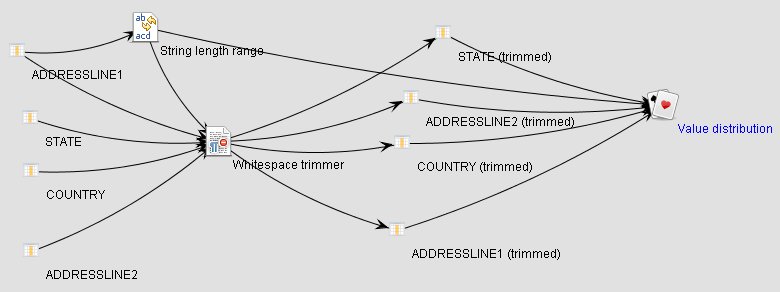
Following up on Winfried van Holland's blog post on having to cleanse 180 million names I thought I'd share a cool screenshot from a funny moment at the Human Inference office today, when we where experimenting with good ways to visualize our execution flow in DataCleaner...

The diagram shows 1) the steps that we go through in our filtering process, 2) the dependencies between them, 3) and a circle layout that we tried out and dismissed ;-)

Anyways, a funny moment and quite a nice view of just how much execution power you can extract from a tool like DataCleaner.

20110217

Pre-processing in DataCleaner 2: Why?

Last monday we released the new DataCleaner 2.0 and one of the major new features in it is the ability to transform and filter your data using the tool. Previously the common answer for someone asking about transformation in DataCleaner has been to tell them that "there are already good tools for this available elsewhere, so use them". So why did we choose to focus on data processing in DataCleaner 2.0? And what are the capabilities of DataCleaner in terms of transformations? Is DataCleaner over time going to evolve into a full-fledged ETL tool? I'll try to answer these questions.

All your data quality functions in one place

The obvious answer is that we want to provide more data quality functionality and that transformations is something that a lot of people need. While doing data profiling it is often needed to do data adjustments, eg. to tokenize values, extract certain information, filter which rows gets profiled etc. You can also do all this also by applying an ETL tool or maybe even by creating database VIEWs. The problem with such an approach is that it will eventually get in your way because you're trying to get 2-3 independent tools to work nicely together, instead of just having these functions available where you need them.

Transformations for the DQ domain

Possibly even more important is that the transformations that you want to employ in Data Quality analysis are typically quite different than those that come out-of-the-box in database scripts and ETL tools. Such tools are typically quite generic and will provide general purpose tokenizers etc., but will typically lack transformations pertaining to the DQ-domain, such as date mask matchers, dictionary lookups and synonym replacements, standardization of email adresses, names and URL's.

Non-persistent transformations

When you do pre-processing in separate tools, you also need to persist your transformed datasets. In Data Quality analysis this is just a waste of resources and provides poor performance. If you need to perform transformations, apply filtering etc. for the purpose of analysis, profiling and exploring your data it is much more feasible to just perform these transformations when needed in stead of storing them up front. This also allows for a much more free user experience where you can actually experiment with your data and you analysis in stead of having to overthink it.

Is DataCleaner's validator gone? No, it's just filtering with added output handling!

DataCleaner 1.x was known to have a strict separation between the activities "profile" and "validate". Since this separation is gone in 2.0, one might ask, "Is DataCleaner's validator gone? I can only see analysis jobs!". But the answer is no, we just consider validation as a type of analysis (thus, analysis is a broader term, comprising both profiling, validation and more). You can easily perform all the validation operations of DataCleaner 1.x, but the approach is a bit different because you basically apply filters in stead of "validators". There is even an example of this in the "Introduction to analyzing, cleansing and filtering data" webcast, available on DataCleaner's website.

20110214

DataCleaner 2 released, Human Inference acquires eobjects.org, I have a new job and dataqualitypro.com even publishes a nice article about it

Earlier I've promised you some "Big news" today and here it is... Hmm, where to start, so much to say.


OK, let's start with the software, after all that's what I think most of my blog readers care most about:


DataCleaner 2.0 was released!

To me this is the biggest news for the DataCleaner community in a LONG time. DataCleaner 2.0 is a major release that I and my new employer (read more below) have put a lot of effort into. I just had a look at some source code statistics and actually the 2.0 release is larger (in terms of lines of code, source code commits, contributions etc.) than all previous DataCleaner releases together. I don't want to say a lot about the new functionality here, because it's all presented quite well at the DataCleaner website.

More information: Watch out, dirty data! DataCleaner 2.0 is in town!


MetaModel 1.5 was released!

My other lovechild, MetaModel, have also just been released in a version 1.5! MetaModel 1.5 is also a quite big improvement on the previous 1.2 version. The release contains a lot of exciting new features for doing querying and datastore exploration as well as a lot of maturity bugfixes.

More information: What's new in MetaModel 1.5?


And then let's move on to a major announcement that I definately think will affect the eobjects.org community positively:


Human Inference acquires eobjects.org

This might come as a surprise to quite a lot of you, so let me explain a bit. For some years DataCleaner and the other eobjects.org projects have been independent open source projects that I've invested a lot of time in. The projects have grown nicely in terms of users and the ideas have been manyfold. My ambitions for the projects have always been high, but they suffered from the fact that I was mostly working on them in my free time. One of the many fun things about doing these projects was that I've gotten to meet up with a lot of exciting people that thought my projects where interesting. At one time I met some people from the data quality vendor Human Inference, who thought DataCleaner was great and they wanted to know if they could in some way use it in collaboration with their commercial offerings. From my end of the table I was on the other hand thinking that their products offered some features that would be an excellent addition to DataCleaner's functionality. So what we did was a deal to try and raise the value for both parties. And with that in mind, here's the press release about it:

More information: Human Inference completes acquisition of DataCleaner and eobjects.org

I have a new job

I now work with Human Inference to actively grow the DataCleaner project, MetaModel as well as Human Inference's commercial products. We're building really exciting cloud-based data quality services that I think will complement the open source offering nicely. Of course it's not all going to be free, but I promise that even for the users who don't want to pay for the additional services, the acquisition and my new job will be beneficial anyway, because we're adding a lot of new resources to the projects that are improving on both the open source parts and the commercial plug-ins.


And in the end I just also want to mention that Data Quality Pro has a great article about a lot of these news, including an interview with me and Sabine Palinckx, the CEO of Human Inference.

More information: Open Source DataCleaner gets a major update, Human Inference enters the Open Source Data Quality Market

20101214

Richer reporting and charts in DataCleaner 2

One of the important new features of DataCleaner 2 will be a much richer reporting module than the old one. In DataCleaner 2 the result of an analysis is not limited to the crosstabular view that a lot of you know from DataCleaner 1.x. In this blog post I will provide you with a preview of some of the exciting reports that have been added lately.

Charts in Value distribution
The Value distribution component is well-known to most DataCleaner users. It provides a simple but crucial look into the distribution of values for a column. In DataCleaner 2.0 we are enhancing the experience of working with the Value Distribution by applying visually pleasant charts as well as grouping of values with similar frequencies. Take a look at this example result on a country-column:


Now you might think: "Looks nice, but that's going to be messy for columns with very oddly distributed values". And you're right. Except that we have applied a rather intelligent grouping mechanism that will make sure we never above a certain amount of slices in a chart. To accomplish this we may need to group together some values by their frequencies which will communicate another important fact: When repeated values occur, how many times do they occur. Take a look at this next example of the value distribution of a customer number column:


As you can see, even though there's a very high amount of customer numbers we are grouping them together by frequency. This is a principle that is actually already known from the <unique> group, except that we now also apply it to further frequencies: <group=2>, <group=3> etc.

Notice also the green arrows in the table to the right. Using this button (or by clicking the slices of the pie-chart) you will be able to drill to detail to view the actual values that make up a given group.

Navigation tree in Phonetic similarity finder

Another application of richer reporting in DataCleaner is for the new Phonetic similarity finder. In short this analyzer will apply a mix of well-known algorithms for similarity checking such as Soundex, Metaphone and Levenshtein distance to produce a set of groups of similar sounding values. What you get is a tree of groups from where you can see the rows that are similar or maybe even identical:


The big news here is of course that this kind of result would be practically impossible to display in a crosstabular result of DataCleaner 1.x - which is also why DataCleaner 1.x doesn't have this feature. I hope that my message with this is clear: DataCleaner 2 will not only be a substantial improvement to the existing data profiling tool, but it will also open up a lot of new doors for more interactive (and interesting) analyses.

Pluggability

The last thing that I would like to point out in this blog entry is the fact that the rendering mechanism in DataCleaner 2.0 is pluggable. This means that you can very easily, using modular Java code, enhance the existing result renderers or implement your own, and simply plug it into the application. Just remember to contribute it back to the community :)

20101116

Java 6 compilation problems

If you're trying to build DataCleaner 2 and get problems like this ...

...src\main\java\org\eobjects\datacleaner\widgets\properties\ChangeRequirementButton.java:[94,6] inconvertible types
found : org.eobjects.analyzer.job.builder.AbstractBeanWithInputColumnsBuilder<capture#10 of ?,capture#279 of ?,capture#140 of ?>
required: org.eobjects.analyzer.job.builder.FilterJobBuilder<?,?>

...src\main\java\org\eobjects\datacleaner\widgets\properties\MultipleInputColumnsPropertyWidget.java:[116,61] inconvertible types
found : org.eobjects.analyzer.job.builder.AbstractBeanJobBuilder<capture#0 of ?,capture#51 of ?,capture#202 of ?>
required: org.eobjects.analyzer.job.builder.TransformerJobBuilder<?>

...src\main\java\org\eobjects\datacleaner\widgets\properties\SingleInputColumnPropertyWidget.java:[73,61] inconvertible types
found : org.eobjects.analyzer.job.builder.AbstractBeanJobBuilder<capture#29 of ?,capture#564 of ?,capture#109 of ?>
required: org.eobjects.analyzer.job.builder.TransformerJobBuilder<?>
... Then I just wanted to let you know that it's actually a compiler error, not a source code error. The Java 6 compiler (pre update 18 I believe) seems to not be able to cope with subtypes of generic interfaces which contain different type parameters than the interface. Of course this should be (and is in newer compiler versions) possible because a subtype may implement an interface with certain type parameters and define a new set of type parameters. So ... Update to the newest JDK please :)

20101026

Preview of the UI in DataCleaner 2

Lately I've been blogging a lot about AnalyzerBeans, which is the name of the new engine of DataCleaner from version 2.0 and onwards. As AnalyzerBeans is nearing a state where it is usable and maturing I have now also taken the first steps of development on the roadmap for DataCleaner 2. As a techie I would like to attribute as much emphasis on the technical capabilities of AnalyzerBeans as possible but honestly it doesn't do much good without a good user interface also. So just as AnalyzerBeans was/is an attempt to rewrite the functional/logical part of DataCleaner, the new UI will be an attempt to deliver an user experience that feels new, exciting, more responsive and interactive. The "sketches" for the new UI is being drawn these days - I'll take you through a few examples.

In the two screenshots below you can see the source data selection and a transformation of this source data. The source selection is pretty similar to the existing DataCleaner UI but notice the new transformation-oriented features. In the example below I want to use a "Name standardizer" transformation which will turn my "real_name" column into four (virtual) columns: First name, Last name, Middle name and Titulation. Similarly I can convert data types, concatenate, tokenize, parse etc.

Another thing that is much needed in the existing DataCleaner UI is more elaborate configuration options for the various profiles. In the screenshot below you'll see the new and improved version of the Pattern finder which includes a new set of configuration options. Notice that both my physical columns (real_name) and my virtual columns (as mentioned before) are available for the Pattern finder.
There are a lot of other exciting things going into the new DataCleaner version but I will safe some news for later :) For now, I can only invite everyone to try it out. All you have to do is:
> mkdir datacleaner_dev
> cd datacleaner_dev
> svn co http://eobjects.org/svn/AnalyzerBeans/trunk AnalyzerBeans
> cd AnalyzerBeans
> mvn install
> cd ..
> svn co http://eobjects.org/svn/DataCleaner/trunk DataCleaner
> cd DataCleaner
> mvn install
> java -jar target/DataCleaner-2.0-SNAPSHOT.jar
Good luck and let us know what you think :-)

PS: Maybe I should not that even though the new version is usable there are still a lot of things NOT working. If you're wondering if something odd is a bug or a feature that has simply not yet been implemented yet - don't hesitate to ask.

20100913

Pattern finder 2.0 - the latest feature in DataCleaner


I'm happy to be able to present a feature in this blog post that I know a lot of you have been asking for: A new and improved "Pattern finder" (as known in DataCleaner).

The new Pattern finder works similarly to the old one. The new thing is that it supports a wide variety of configuration options (and it has been designed so that it will be significantly easier to add more options, if needed). Here are the current available options:

PropertyDefault valueDescription
Discriminate text case true Sets whether or not text tokens that are upper case and lower case should be treated as different types of tokens.
Discriminate negative numbers false Sets whether or not negative numbers should be treated as different token types than positive numbers.
Discriminate decimals true Sets whether or not decimal numbers should be treated as different token types than integers.
Enable mixed tokens true Enables the "mixed" token type (denoted as '?' output). This type of token will occur when numbers and letters occur without separation of whitespaces.
Ignore repeated spaces false Sets whether or not repeated whitespaces should be ignored (ie. matched with single whitespaces)
Decimal separator ,* The separator used to identify decimal numbers.
Thousands separator .* The character used as a thousands separator in large numbers.
Minus sign -* The character used to denote negative numbers.
Predefined token name (none) Can be used to define an anticipated "predefined token" that should be replaced before any subsequent pattern recognition. Requires that the "Predefined token regexes" property is also set. An example of a name could be "Titulation"
Predefined token regexes (none) Defines a set of regular expressions for the "predefined token". Requires that the "Predefined token name" property is also set. An example value for these regular expressions could be "[Mr,Mrs,Miss,Mister]" (which would correspond to the "Titulation" name).

* = Depending on locale, the shown value is the typical one.

This may all seem complicated, but rest assured that the default values are reasonable and almost exactly resembles what you would expect from the Pattern finder in DataCleaner (except for the "Discriminate text case" property, which is inherently turned off in DataCleaner).

Here's how it works with a set of different inputs (job title, email, name) and configurations:
> java -jar target/AnalyzerBeans.jar -conf examples/conf.xml -job examples/patternfinder_job.xml 

RESULT:
                            Match count Sample      
Aaaaa Aaa                            17 Sales Rep   
AA Aaaaaaaaa                          2 VP Sales    
Aaaaa Aaaaaaa (AAAA)                  2 Sale Manager (EMEA) 
Aaaaa Aaaaaaa (AAAAA, AAAA)           1 Sales Manager (JAPAN, APAC) 
Aaaaaaaaa                             1 President   


RESULT:
                                  Match count Sample      
aaaaaa.aaa@aaaaaaa[Domain suffix]           4 foo.bar@company.com 
aaaaaaa@aaaaaaaa[Domain suffix]             3 santa@claus.com 


RESULT:
                 Match count Sample      
aaaaaaa aaaaa              4 Jane Doe    
aaaaaaaa, aaaaaa           2 Bar, Foo    
aaa. aaaaaa aaa            1 Mrs. Foobar Foo
Notice that in the email example the two patterns end with "[Domain suffix]". This is because I've registered a corresponding "Predefined token" for this:
<analyzer>
  <descriptor ref="Pattern finder" />
  <properties>
    <property name="Predefined token name" value="Domain suffix" />
    <property name="Predefined token regexes" value="[\.com,\.org]" />
  </properties>
  <input ref="col_email" />
</analyzer>
So now that you've seen the new Pattern finder... Does it meet all your expectations? Let me know if you've got any ideas or unresolved issues!

20100912

Join the DataCleaner group at LinkedIn

I've opened up a new LinkedIn group for DataCleaner and I would like to invite anyone with an interest in DataCleaner and open source data quality to join.

If you've read my blog lately you will know that we are currently in heavy development of a new engine for the application (called "AnalyzerBeans") and the groups focus right now is also on this development. But it is also for sharing experience, discussing features, issues and solutions.

Join the group to help us gather a bit of traction for the project.

20100907

Developing a value transformer using the DataCleaner Java API

In this blog-entry I will demonstrate the Java API of DataCleaner to create transformers, ie. components for transforming/converting/tokenizing/generating new values based on the existing values of a dataset. You will need Java programming skills to follow this tutorial.
I find that the easiest way to explain this process is by running an example. So here's my case: I want to transform birthdates of persons (represented as Date fields) into age fields (represented as a number field). A scenario is depicted below:

After the transformation I will be able to independently process the age field, eg. with a number analysis, value distribution or apply some business rule that depends on age.
The requirements for building a transformer class are the following:
  • The class must implement the Transformer interface.
  • The class must be annotated with the (javax.inject) @Named annotation. The annotation takes an argument: The readable name of the transformer. We will thusly annotate: @Named(”Date to age”)
  • In order to read from the incoming fields we need to inject an InputColumn<E> instance (or alternatively an array of these), where <E> is the data type of the incoming fields. To inject we use the @Configured annotation. In our example this translates to: @Configured InputColumn<Date> dateColumn;
After these steps our code will look something like this:
@Named("Date to age")
public class DateToAgeTransformer implements Transformer {

  @Configured
  InputColumn<Date> dateColumn;

  @Override
  public OutputColumns getOutputColumns() {
    // TODO
    return null;
  }

  @Override
  public Object[] transform(InputRow inputRow) {
    // TODO
    return null;
  }
}
As we see, there are two methods defined by the Transformer interface, that we need to implement. They are:
  • getOutputColumns(): This method is called by the framework to determine which virtual columns will be produced by the transformer. In our case it is quite simple: The transformer creates virtual columns for age (both in days and in years, just to make it more flexible). The method body should therefore just be:
    return new OutputColumns(Integer.class, "Age in days", "Age in years");
  • transform(InputRow): This method will be called for each row with values to be transformed. The return type of the method is an Object-array representing the new values of the row. The indexes of the returned array should match the output columns, ie. index 0 is for ”Age in days” and index 1 is for ”Age in years”. Let's have a look at the methods implementation:
    Integer[] result = new Integer[2];
    Date date = inputRow.getValue(dateColumn);
    
    if (date != null) {
      long diffMillis = today.getTime() - date.getTime();
      int diffDays = (int) (diffMillis / (1000 * 60 * 60 * 24));
    
      result[0] = diffDays;
    
      // use Joda time to easily calculate the diff in years
      int diffYears = Years.yearsBetween(new DateTime(date), new DateTime(today)).getYears();
       result[1] = diffYears;
    }
    
    return result;
Of course I didn't do all the work of writing this tutorial without checking in the code so you could try it in action. The code for the ”Date to age” transformer is available here and there's also a unittest available here, that is pretty usable as a demonstration of how to unittest transformers. I hope some of you engage in developing transformers and let me know how it turns out. In my next blog post I'll explain how to build Analyzers which are the obvious next step when developing components for DataCleaner.
There are a few other good examples of transformers that might be of interest:
  • The Convert to date transformer which will try to convert any value to a date. This is perhaps useful in combination with the transformer that I've just explained in this tutorial. In other words: These two transformers may need to be chained if for example the birth date to be transformed is stored in a String-based field.
  • The Tokenizer transformer because it has a flexible amount of output columns based on the users configuration. Notice the @Configured Integer numTokens that is used in the getOutputColumns() for this purpose.

20100829

Now you can run AnalyzerBeans (from the shell)

Lately I've been blabbering a lot about the marvels of AnalyzerBeans - the project that is aimed at re-implementing an engine for data analysis based on my experience from DataCleaner.

An important milestone in any development project, especially those like AnalyzerBeans, that are implemented bottom-up, is when it is actually possible to use the application without having any developer skills. So far the development of AnalyzerBeans has been focused on making it work in a unittesting perspective, but now we've reached a point where it is also possible to invoke the engine from the command line.

Since we haven't released AnalyzerBeans yet, you will still have to check out the code and build it yourself. It's rather easy - it just requires Subversion and Maven. First, check out the code:

> svn co http://eobjects.org/svn/AnalyzerBeans/trunk AnalyzerBeans

Now build it:

> cd AnalyzerBeans
> mvn install

And now run the example job that's in there:

> java -jar target/AnalyzerBeans.jar \
> -configuration examples/conf.xml -job examples/employees_job.xml

The job will transform/standardize the "full name" and "email address" columns of a CSV-file (located in the examples-folder) and then print out value distribution and string analysis results for the standardized tokens: First name, Last name, Email username, Email domain.

If you've gone this far, you've probably also tried opening the xml-files employees_job.xml and conf.xml in the examples-folder. Maybe you've even figured out that the conf.xml describes the application setup and that the employees_job.xml file describes the job contents. You can edit these files as you please to further explore the application. I will be sure to update my blog soon with some more examples. Also one of the next features of the command line interface will be to print the available Analyzers and Transformers in order to make it easier to author the xml job-files.

If you're just trying this out now and if you are getting excited about AnalyzerBeans, here are my previous blog posts on the subject. Please don't hesistate to let me know what you think.

20100719

Data transformation added to AnalyzerBeans

I have been doing a lot of improvements to the API of AnalyzerBeans - a sandbox project that I am very passionate about. In short it is a new Data Profiling/Analysis engine that I think will eventually replace the core parts of DataCleaner. So here's a bit about "what's cookin'":

  • The largest of the new features is that it is now possible to transform data before it will be analyzed. The idea here is that it should be possible to tokenize/split/convert/etc. values before they enter the analysis. This means one fundamental change to analyzers, namely that they consume data through an intermediary input-column type which can be virtual (to represent eg. a token) or physical (to represent a "regular" column in a datastore). The new component type, "Transformer Beans" will support all the same cool stuff that I've already introduced to the analyzer components like dependency injection, persistent/scalable collections, annotation-driven composition and registration etc.
  • Another neat thing that I'm currently finishing up is an Analysis Job Builder. The idea is that analysis jobs should be immutable because this makes it a lot safer to parallelize the process of executing the jobs. Immutable structure are very good to work with when you are executing but they tend to be tedious when you're building the structure. So I'm also adding an API for building the jobs which will emphasize type-safety and syntactic neatness to make it easy to programmatically manage and verify the jobs you're building. This will make it a lot easier to build a good UI for AnalyzerBeans.